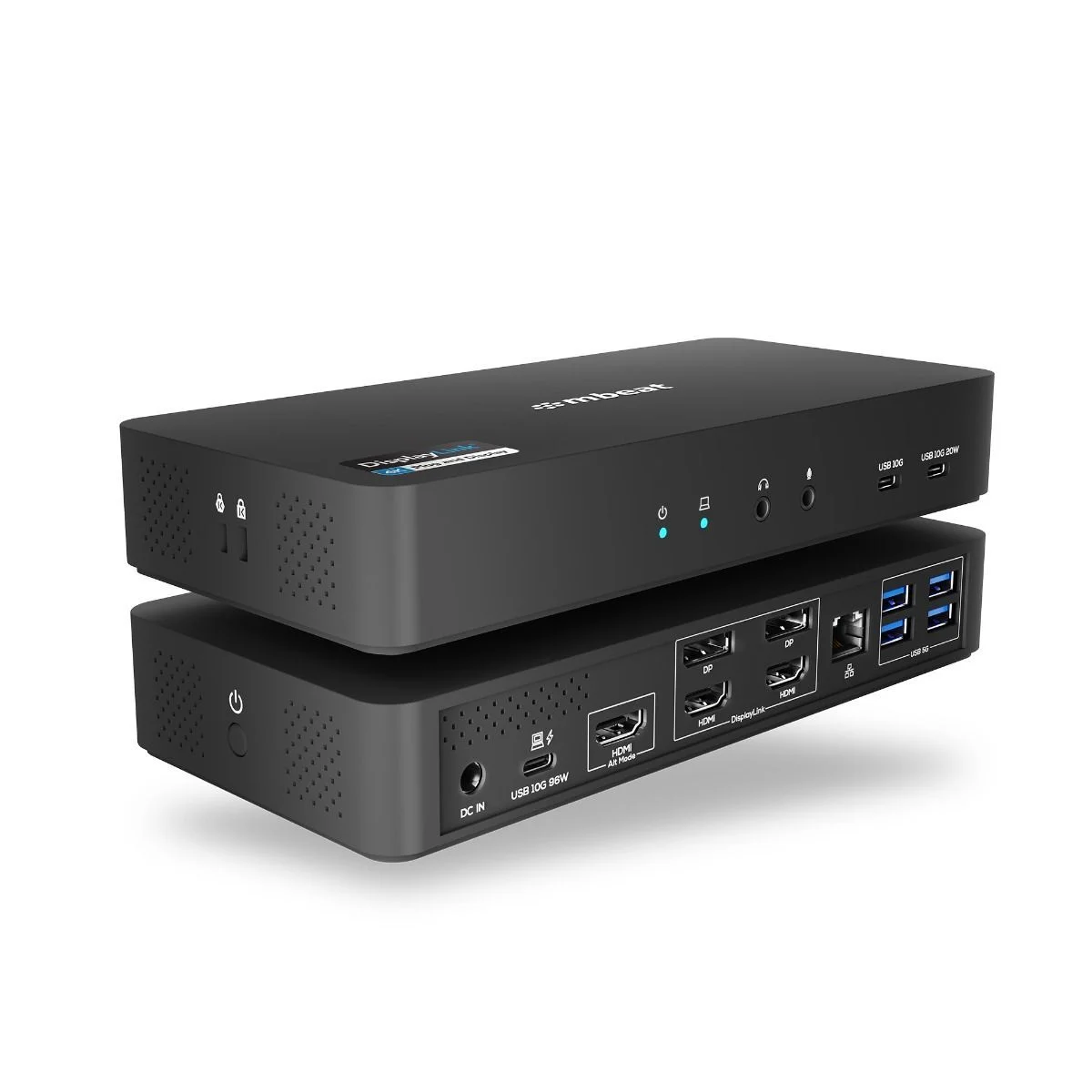
The mbeat USB-C Triple 4K Display Docking Station turns a USB-C laptop into a multi-screen workstation, driving three 4K monitors at 60Hz alongside high-speed USB expansion, Gigabit Ethernet and laptop charging. It suits video editors, analysts, coders and anyone who needs a fully extended desktop across multiple displays.
Key Features
- Triple 4K/60Hz external displays: one HDMI port via native USB-C DP-Alt, plus two DisplayLink DP/HDMI outputs
- DisplayLink extended desktop overcomes the Mac M1/M2/M3 mirroring limitation with a one-time driver installation
- High-speed USB expansion: 2 × USB-C 10Gbps ports (one with 20W PD charging) and 4 × USB-A 5Gbps ports
- 135W power supply powers the dock, delivers up to 96W PD passthrough to your laptop and 20W charging to phones or tablets
- K-Lock slot, power on/off button, Gigabit Ethernet and audio jack for a stable, professional workstation setup
Specifications
- Host port: 1 × USB-C 10Gbps upstream with PD passthrough (up to 96W)
- Video outputs: 1 × HDMI 2.0 (USB-C DP-Alt); 2 × DP 1.2 / HDMI 2.0 (DisplayLink)
- Maximum resolution: triple 4K@60Hz
- USB ports: 2 × USB-C 10Gbps (1 with 20W PD charging), 4 × USB-A 5Gbps
- Networking: 1 × RJ45 Gigabit Ethernet
- Audio: 3.5 mm headphone jack and microphone jack
- Security and control: K-Lock slot, power on/off button
- Power: 135W power adapter included
- Product dimensions: 202.85 × 95 × 32.6 mm
- Product weight: 0.37 kg
- Cable included: 1 m
- Package dimensions: 255 × 130 × 89.5 mm
- Package weight: 1.13 kg
Compatibility
- Windows: 7 / 8.1 / 10 / 11
- Mac: macOS 10.14 Mojave / 10.15 Catalina / 11 Big Sur / 12 Monterey / 13 Ventura / 14 Sonoma (M1/M2/M3 supported)
- Linux: Ubuntu 20.04+ / Fedora 34+ / Debian 11+
- Chrome OS: R55+ / Chromebooks since Jan 2015 (Exynos and Tegra models excluded)
- Android: 5.0 Lollipop+
- Works with USB-C laptops supporting DP-Alt mode, including MacBook Pro / Air (M1, M2, M3 series), Dell XPS series, ThinkPad X / T series, HP EliteBook and Spectre series, Microsoft Surface devices with USB-C, and other major USB-C laptops supporting DisplayPort Alt Mode
- A DisplayLink driver must be installed before the dock can function; once installed it works as plug and display. Drivers are available from the Synaptics website or via the user manual — download the correct version for your operating system
- Your laptop must support USB-C DP-Alt mode to enable triple-display functionality
What's in the Box
- USB-C Triple 4K Docking Station
- USB-C to C cable
- 135W power adapter
- Instruction manual
- Product registration card
Note: The 135W adapter supplies power to the dock, peripherals and laptop charging through PD passthrough (up to 96W ±5%). If your laptop requires more than 100W (such as 140W high-performance laptops), the dock still delivers up to 96W, which may result in slightly slower charging performance under peak load.